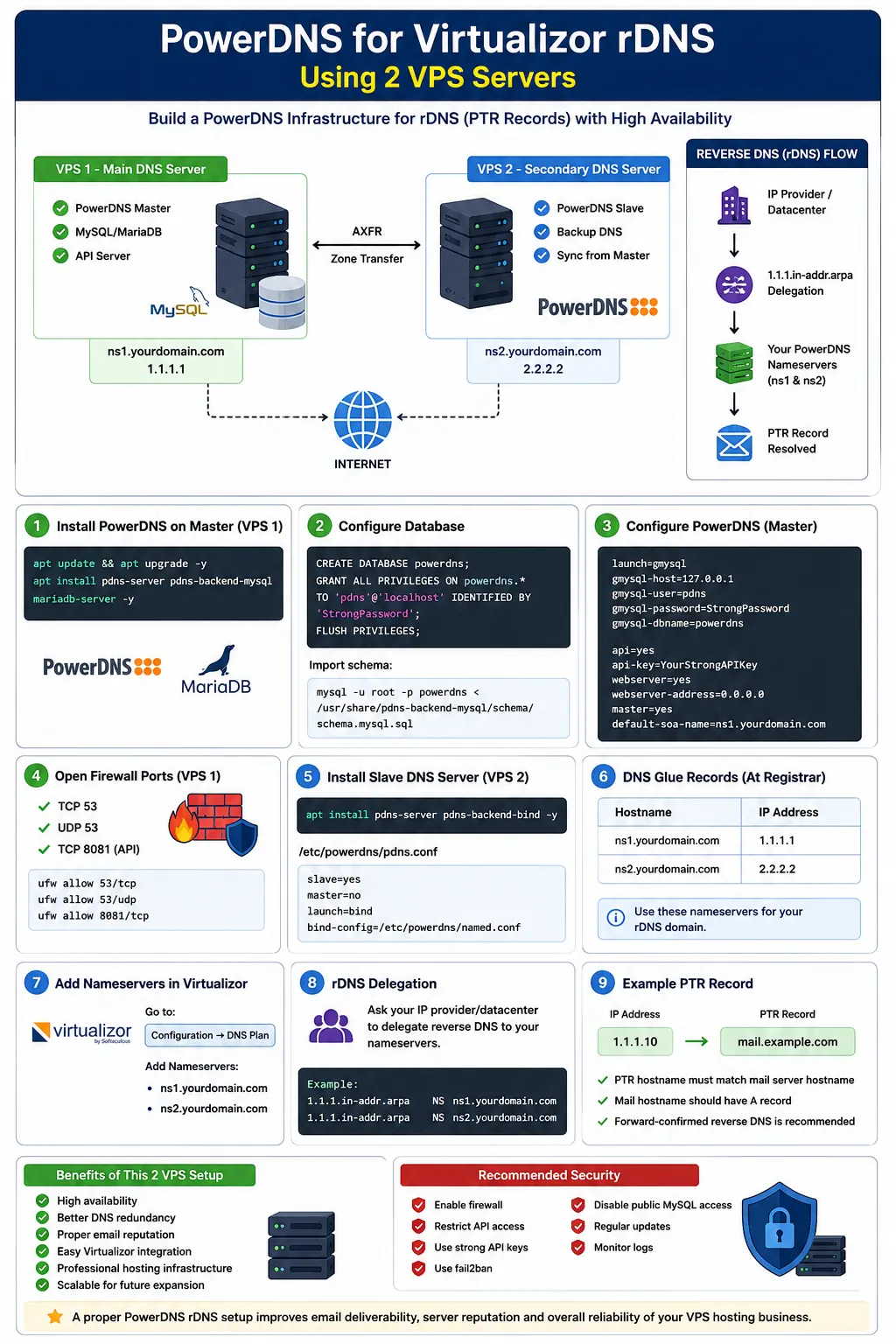
How to Build a PowerDNS Setup for Virtualizor rDNS Using Two VPS Servers
- By Admin
- 13 May, 2026
How to Build a PowerDNS Setup for Virtualizor rDNS Using Two VPS Servers
If you are running a VPS hosting business with Virtualizor, proper reverse DNS (rDNS / PTR records) is extremely important for email delivery, reputation, and avoiding spam folder issues.
In this guide, we will build a simple and reliable PowerDNS infrastructure using 2 VPS servers for rDNS management.
Why Use PowerDNS for rDNS?
Using PowerDNS gives you:
- Fast DNS performance
- Easy API integration
- MySQL/MariaDB backend support
- Better scalability
- Simple replication between servers
- Easy integration with Virtualizor
This setup is commonly used by hosting providers and VPS businesses.
Recommended Setup
VPS 1 — Main DNS Server
Functions:
- PowerDNS Master
- MySQL/MariaDB Database
- Main API Server
Example:
- Hostname:
ns1.yourdomain.com - IP:
1.1.1.1
VPS 2 — Secondary DNS Server
Functions:
- PowerDNS Slave
- Backup DNS
- Sync from Master
Example:
- Hostname:
ns2.yourdomain.com - IP:
2.2.2.2
Recommended OS
You can use:
- Ubuntu 22.04
- Debian 12
Ubuntu is easier for beginners.
Step 1 — Install PowerDNS on Master Server
Update system:
apt update && apt upgrade -y
Install PowerDNS and MariaDB:
apt install pdns-server pdns-backend-mysql mariadb-server -y
Step 2 — Configure Database
Login to MariaDB:
mysql -u root -p
Create database:
CREATE DATABASE powerdns;
GRANT ALL PRIVILEGES ON powerdns.* TO 'pdns'@'localhost' IDENTIFIED BY 'StrongPassword';
FLUSH PRIVILEGES;
Import schema:
mysql -u root -p powerdns < /usr/share/pdns-backend-mysql/schema/schema.mysql.sql
Step 3 — Configure PowerDNS
Edit configuration:
nano /etc/powerdns/pdns.conf
Add:
launch=gmysql
gmysql-host=127.0.0.1
gmysql-user=pdns
gmysql-password=StrongPassword
gmysql-dbname=powerdns

api=yes
api-key=YourStrongAPIKey
webserver=yes
webserver-address=0.0.0.0
webserver-allow-from=0.0.0.0/0
master=yes
default-soa-name=ns1.yourdomain.com
Restart:
systemctl restart pdns
systemctl enable pdns
Step 4 — Open Firewall Ports
Allow:
- TCP 53
- UDP 53
- TCP 8081 (API)
Example with UFW:
ufw allow 53/tcp
ufw allow 53/udp
ufw allow 8081/tcp
Step 5 — Install Slave DNS Server
On VPS 2:
apt install pdns-server pdns-backend-bind -y
Edit:
nano /etc/powerdns/pdns.conf
Add:
slave=yes
master=no
launch=bind
bind-config=/etc/powerdns/named.conf
Restart:
systemctl restart pdns
Step 6 — Configure DNS Glue Records
At your domain registrar create:
| Hostname | IP |
|---|---|
| ns1.yourdomain.com | 1.1.1.1 |
| ns2.yourdomain.com | 2.2.2.2 |
Then use these nameservers for your rDNS domain.
Step 7 — Add Nameservers Inside Virtualizor
Open Virtualizor Official Website admin panel:
Go to:
Configuration → DNS Plan
Add:
- ns1.yourdomain.com
- ns2.yourdomain.com
Step 8 — Configure rDNS Delegation
You must ask your IP provider/datacenter to delegate reverse DNS to your nameservers.
Example:
1.1.1.in-addr.arpa → ns1.yourdomain.com
1.1.1.in-addr.arpa → ns2.yourdomain.com
After delegation, PTR records will work automatically.
Example PTR Record
Example:
| IP | PTR |
|---|---|
| 1.1.1.10 | mail.example.com |
Important:
- PTR hostname must match mail server hostname
- Mail hostname should also have A record
- Forward-confirmed reverse DNS is recommended
Recommended Security
For production:
- Enable firewall
- Restrict API access
- Use fail2ban
- Disable public MySQL access
- Use strong API keys
Benefits of This 2 VPS Setup
High availability
Better DNS redundancy
Proper email reputation
Easy Virtualizor integration
Professional hosting infrastructure
Scalable for future expansion
Final Thoughts
A dedicated PowerDNS setup for rDNS is one of the best investments for VPS hosting providers. Using two VPS servers ensures redundancy and improves DNS reliability for customer mail servers.
If you run a hosting business like Ummah Host, this type of infrastructure helps improve client email delivery and overall server reputation significantly.

Author By
Admin
Search Blog
Categories
- Problem Solving 2
- RDP Hosting 4
- SMS Service 17
- IP Number 11
- Reseller Hosting 5
- Promo Offer 2
- Achieve 3
- SSD Hosting 5
- cPanel Hosting 7
- BDIX Hosting 7
- Email Hosting 4
- Dedicated Server 7
- User Guide 0
- Security 4
- Online security 6
- Business 5
- SEO 3
- VPS Hosting service 31
- Manage Hosting 1
- domain hosting service 28
- Domain 1
- Hosting 40